There is a bug in Task Scheduler of Windows 10. If the network condition of a Scheduled Task gets enabled and a specific network connection gets selected, the corresponding Scheduled Task will not run anymore. To reproduce the problem open properties of any Scheduled Task (right click on Scheduled Task -> Properties) and switch to the Conditions tab. Tick the box Start only if the following network connection is available and select a specific network condition.

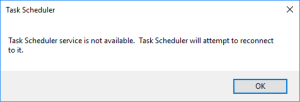
Click Ok and try to run the before edited Scheduled Task manually (right click on Scheduled Task -> Run). When doing so the following error message pops up:
Task Scheduler service is not available. Task Scheduler will attempt to reconnect to it.
If Any connection instead of a specific connection gets selected or if the network condition gets disabled at all, the Scheduled Task runs again perfectly fine.
A search on the Internet for this problem indicated, that a few other people had the same problem.
However I could not find any entries in Microsoft Knowledge Base or Microsoft Connect. Because of that I decided to report a problem via Microsoft Feedback Hub. My feedback can be found here. Please upvote!

I'm a software engineer working at isolutions AG


 d-fens GmbH
I confirm this error. Have run SFC and DISM. Even created the task from scratch