This post is rather ad memoriam propriam than for the broader audience. Unless that audience expresses the wish to install 4 NVIDIA RTX PRO 6000 Blackwell Max-Q Workstation GPUs on a Dell Precision 7960T.

At this time, Dell supports Ubuntu 22.04 LTS on the Precision 7960T workstation. And when I installed it, at first the system did not find the NVIDIA cards. So, in this article I describe the steps it took to get a stable environment for Ollama that we use for our current requirement elicitation project.

Bear in mind, that I am in no way an expert in Linux or Ubuntu. So please forgive me, if the following was totally clear to you right from the start.

The main problem with the installation was a mix between Ubuntu drivers and NVIDIA open drivers. This lead to the behaviour, that after a restart the driver stack or nvidia-smi disappeared.

In addition, I had to change these settings:

  1. Disable secure boot in the BIOS
  2. Pin the NVIDIA CUDA repository
  3. Change ASPM power management
  4. Disable NVIDIA dynamic power management

Installation

When I started the installation, the system had this kernel version: 6.8.0-117-generic. The current NVIDIA drivers at the time of the installation are: 595.

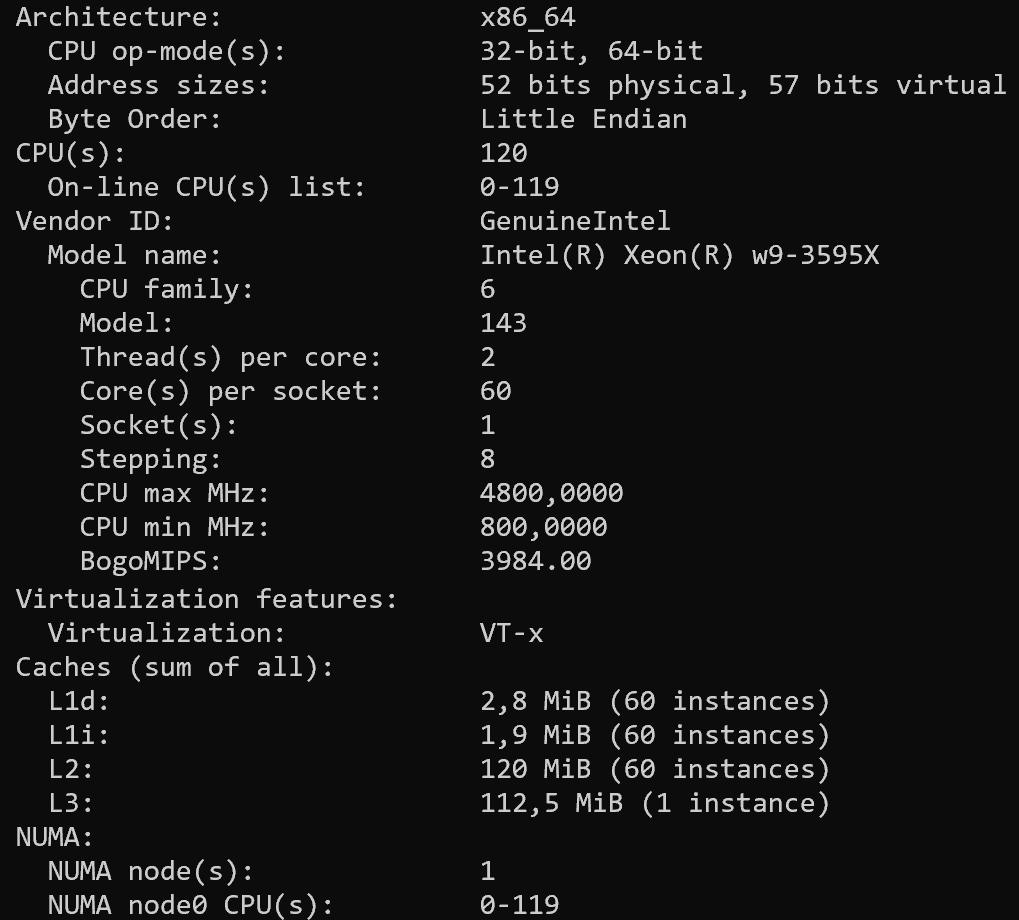
The CPU is a standard Intel amd64 (or x86_64) CPU:

Disable Secure Boot in BIOS

I am not familiar with Dell servers, so it took me some time to find out, that “Secure Boot” is not in the “Security” menu, but the general menu.

Add NVIDIA CUDA Repository

# Add the NVIDIA CUDA apt repository for Ubuntu 22.04
wget https://developer.download.nvidia.com/compute/cuda/repos/ubuntu2204/x86_64/cuda-keyring_1.1-1_all.deb
sudo dpkg -i cuda-keyring_1.1-1_all.deb
sudo apt update

I am aware, that this will break when I ever want to upgrade to 26.04 LTS or later.

Pin the NVIDIA CUDA Repository

sudo tee /etc/apt/preferences.d/nvidia-cuda-pin <<'EOF'
Package: nvidia-dkms-open nvidia-firmware nvidia-kernel-common libnvidia-compute libnvidia-cfg1 libnvidia-decode libnvidia-gpucomp nvidia-persistenced
Pin: origin developer.download.nvidia.com
Pin-Priority: 1001
EOF

Do not install these drivers from Ubuntu multiverse:

  • nvidia-utils-595
  • libnvidia-compute-595
  • nvidia-kernel-common-595
  • nvidia-firmware-595-595.71.05

The are in conflict with the drivers from the CUDA repository and break the driver stack.

Install the NVIDIA Driver Stack

Here it was important to use “NVIDIA OPEN” drivers. I read that since “Blackwell” architecture only the “OPEN” drivers work.

sudo apt install linux-headers-$(uname -r)
sudo apt install \
nvidia-dkms-open \
nvidia-firmware \
nvidia-kernel-common \
libnvidia-compute \
libnvidia-cfg1 \
libnvidia-decode \
libnvidia-gpucomp \
nvidia-persistenced

When I installed this, I had a firmware driver conflict that I “solved” with an overwrite:

sudo dpkg -i --force-overwrite \
/var/cache/apt/archives/nvidia-firmware_595.71.05-1ubuntu1_amd64.deb
sudo apt-get -f install

Then, I rebuilt the DKMS:

sudo dkms autoinstall
dkms status
# We expect something like this: nvidia/595.71.05, 6.8.0-117-generic, x86_64: installed

After that nvidia-smi showed this (even after multiple reboots):

+-----------------------------------------------------------------------------------------+
| NVIDIA-SMI 595.71.05 Driver Version: 595.71.05 CUDA Version: 13.2 |
+-----------------------------------------+------------------------+----------------------+
| GPU Name Persistence-M | Bus-Id Disp.A | Volatile Uncorr. ECC |
| Fan Temp Perf Pwr:Usage/Cap | Memory-Usage | GPU-Util Compute M. |
| | | MIG M. |
|=========================================+========================+======================|
| 0 NVIDIA RTX PRO 6000 Blac... On | 00000000:16:00.0 Off | Off |
| 30% 31C P8 7W / 300W | 2MiB / 97887MiB | 0% Default |
| | | N/A |
+-----------------------------------------+------------------------+----------------------+
| 1 NVIDIA RTX PRO 6000 Blac... On | 00000000:34:00.0 Off | Off |
| 30% 31C P8 4W / 300W | 2MiB / 97887MiB | 0% Default |
| | | N/A |
+-----------------------------------------+------------------------+----------------------+
| 2 NVIDIA RTX PRO 6000 Blac... On | 00000000:AC:00.0 Off | Off |
| 30% 36C P8 27W / 300W | 2MiB / 97887MiB | 0% Default |
| | | N/A |
+-----------------------------------------+------------------------+----------------------+
| 3 NVIDIA RTX PRO 6000 Blac... On | 00000000:CA:00.0 Off | Off |
| 30% 33C P8 7W / 300W | 2MiB / 97887MiB | 0% Default |
| | | N/A |
+-----------------------------------------+------------------------+----------------------+
+-----------------------------------------------------------------------------------------+
| Processes: |
| GPU GI CI PID Type Process name GPU Memory |
| ID ID Usage |
|=========================================================================================|
| No running processes found |
+-----------------------------------------------------------------------------------------+

Disable PCIe Power Management

But ollama was still not always able to use the GPUs. For this I updated GRUB:

sudo nano /etc/default/grub
# Change the line that start with `GRUB_CMDLINE_LINUX_DEFAULT`to:
GRUB_CMDLINE_LINUX_DEFAULT="quiet splash pcie_aspm=off"
sudo update-grub

Then, disable NVIDIA dynamic power management:

sudo tee /etc/modprobe.d/nvidia-power.conf <<EOF
options nvidia NVreg_DynamicPowerManagement=0x00
EOF

Install NVIDIA support for Ollama

The installation for NVIDIA support was straightforward:

sudo apt install \
nvidia-container-toolkit \
nvidia-container-toolkit-base \
libnvidia-container1 \
libnvidia-container-tools

Test

When I run a larger mode, for example deepseek-r1:70b-llama-distill-fp16, I see that ollama can use all 4 GPUs at the same time:

docker exec ollama ollama ps
NAME ID SIZE PROCESSOR CONTEXT UNTIL
deepseek-r1:70b-llama-distill-fp16 7a7636f7c9fd 234 GB 100% GPU 131072 2 minutes from now

PCIe Speed

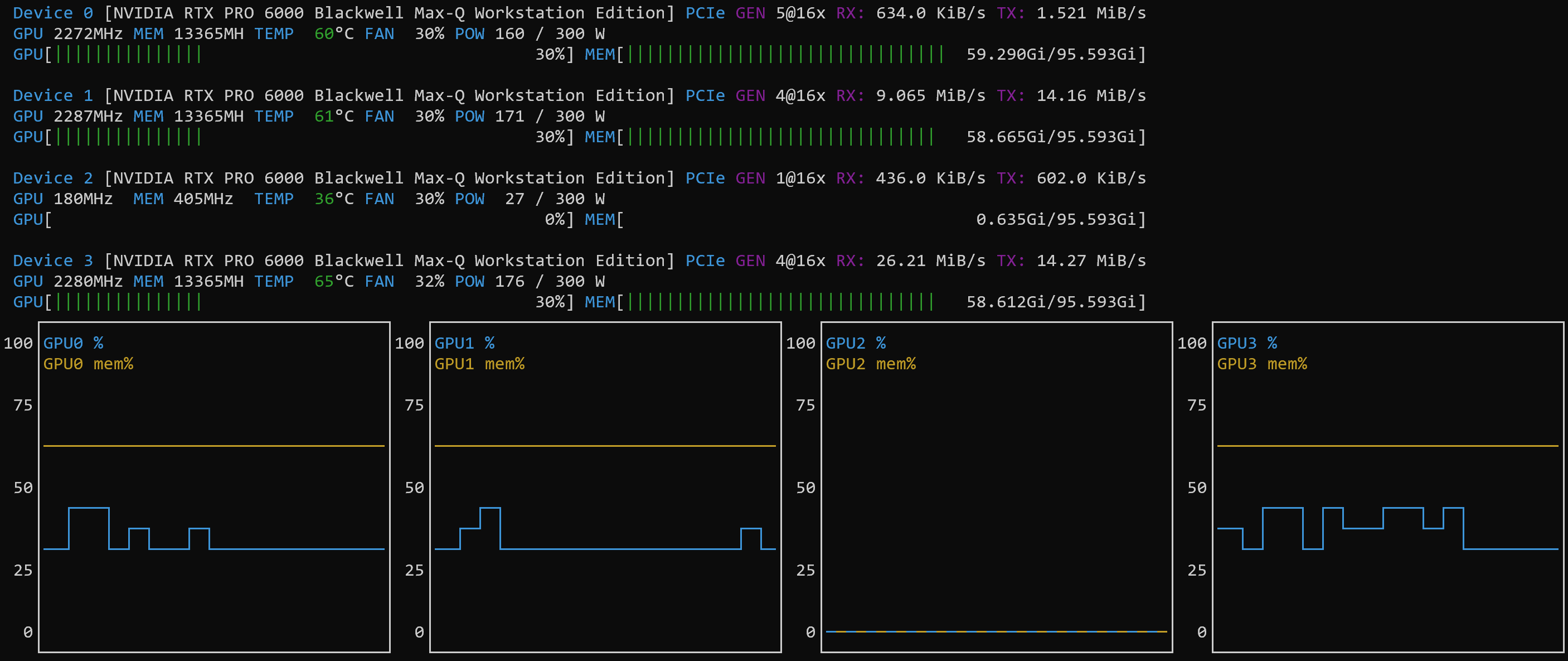
The PCIe slots in the Dell 7960T have different maximum speeds:

  • GPU0 and GPU2 run at a maximum speed of 5@16x.
  • GPU1 and GPU3 run at a maximum speed of 4@16x.

Also interesting to know: even after disabling the power management, the speed of the GPUs will change from 1@16x higher. This depends on the usage. And: the models are noticeably slower on GPU1 and GPU3.

Token Speed

When I ask the question “Who is Donald E. Knuth?” on a newly started deepseek-r1:70b-llama-distill-fp16 model, I get these metrics:

total duration: 2m2.821547202s
load duration: 22.803455278s
prompt eval count: 11 token(s)
prompt eval duration: 2.504074729s
prompt eval rate: 4.39 tokens/s
eval count: 1107 token(s)
eval duration: 1m36.827690145s
eval rate: 11.43 tokens/s

The model spreads over 3 GPUs and uses roughly 234 GB of GPU VRAM. Unfortunately, in this test the model used 2 of the slower cards.

nvtop with NVIDIA GPUs
>>> Who is Donald E. Knuth?
Thinking...
Okay, so I need to figure out who Donald E. Knuth is. I've heard his name before in computer science circles, but I don't really know much about him. Let me start by
breaking down the question: "Who is Donald E. Knuth?"
First, I think he's a significant figure in computing because I remember seeing his name mentioned often in discussions about programming and algorithms. Maybe he wrote
some important books? Oh wait, I think he's known for "The Art of Computer Programming." That rings a bell. It sounds like a multi-volume set that covers a lot of topics
in computer science.
I also recall hearing about something called the Knuth-Morris-Pratt algorithm. So, if that's named after him, he must have contributed to algorithms. I believe that
algorithm is used for string searching, which is pretty fundamental in computer science. That makes me think he's done influential work in that area.
I'm not sure about his education or where he worked. Maybe he was affiliated with a well-known university? Stanford comes to mind because I know they have a strong CS
department, and I think Knuth might be associated there. Also, I've heard him referred to as a professor emeritus, which suggests he's retired but still respected in
academia.
There's also something about him offering rewards for finding errors in his books. I think it's called the "Knuth reward" or something like that. This shows his
commitment to accuracy and maybe a bit of humility, acknowledging that even experts can make mistakes.
What about his other contributions? I'm not certain, but he might have worked on typesetting systems. TeX and LaTeX are typesetting languages used widely in academia for
writing papers, especially in math and computer science. If Knuth created TeX, that's a huge contribution because it's been so influential in academic publishing.
He must have received numerous awards for his work. I can think of the Turing Award, which is like the Nobel Prize of computing. It wouldn't surprise me if he won that.
Also, perhaps other accolades like the National Medal of Science or honorary degrees from various universities.
His personality seems interesting too. He's known for his meticulousness and attention to detail, especially in his writing. I've heard that he uses a specific
typewriter or old computer systems because he prefers certain tools. This kind of dedication to his work probably contributes to the high quality of his publications.
I'm trying to remember if he has any notable quotes or philosophies. Something like "premature optimization is the root of all evil" comes to mind, though I'm not
entirely sure if that's him or someone else. If it is Knuth, then that reflects a design philosophy that emphasizes getting things right before optimizing them.
In terms of his influence on computer science education, his books must be foundational. They're probably used as textbooks in many courses and have shaped how
programming and algorithms are taught. His work has likely influenced generations of computer scientists and programmers.
I also think he's known for being quite approachable despite his prominence. Maybe he's active in corresponding with readers or engaging with the academic community.
This accessibility could contribute to his esteemed reputation.
So, putting it all together, Donald E. Knuth seems to be a polymath in computer science: an author of seminal books, a contributor to fundamental algorithms, creator of
essential tools like TeX, and a recipient of top awards. His work has had a lasting impact on both the theory and practice of computing.
...done thinking.
Donald E. Knuth is a renowned figure in computer science, celebrated for his profound contributions to the field. Here are the key aspects of his career and influence:
1. **Authorship**: He is best known for writing "The Art of Computer Programming," a multi-volume set that is a foundational text in computer science, covering a wide
range of topics with meticulous detail.
2. **Algorithms**: Knuth contributed significantly to algorithm design, notably the Knuth-Morris-Pratt algorithm, which is used for efficient string searching,
highlighting his impact on fundamental computing techniques.
3. **Academic Affiliation**: He is associated with Stanford University as a professor emeritus, reflecting his distinguished academic career and continued influence in
the field.
4. **Commitment to Accuracy**: Knuth offers monetary rewards for errors found in his books, demonstrating his dedication to precision and intellectual humility.
5. **Typesetting Contributions**: Creator of TeX and its extension Metafont, which revolutionized academic publishing, especially in mathematics and computer science,
through their precise typesetting capabilities.
6. **Awards and Honors**: A recipient of the Turing Award, among other prestigious accolades, recognizing his monumental contributions to computing.
7. **Philosophy and Personality**: Known for his meticulousness and design philosophy, encapsulated in quotes like "premature optimization is the root of all evil,"
emphasizing correctness over efficiency.
8. **Influence on Education**: His works have shaped computer science education, influencing generations through their use as textbooks and foundational resources.
9. **Accessibility**: Despite his prominence, Knuth is approachable and engages with the academic community, enhancing his reputation as a leader in the field.
In summary, Donald E. Knuth is a polymath whose contributions to algorithms, programming, typesetting, and education have left an indelible mark on computer science,
making him one of its most influential figures.

Power Consumption

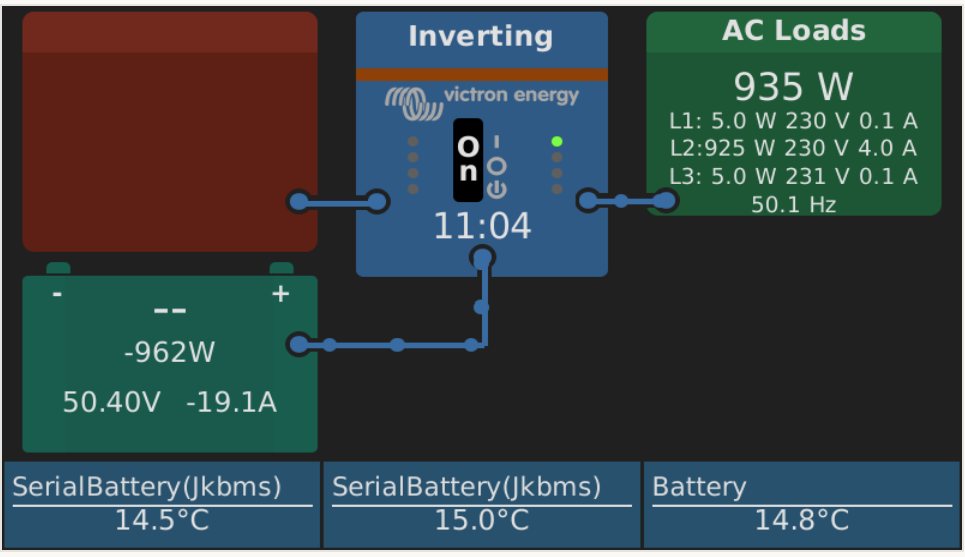
This is the power consumption at the time of test on L2:

Summary

This is a quick overview of what I had to change when I installed NVIDIA support for ollama on my workstation. Next, I will examine if I can install Ubuntu 26.04 LTS on the system.

Leave a comment

This site uses Akismet to reduce spam. Learn how your comment data is processed.